Posts

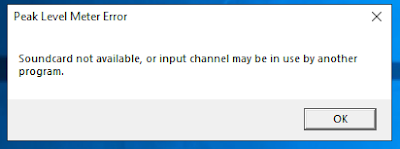
How to solve the soundcard not available issue with Peak Programme Meter Version 1.90 in Windows Server 2019
Image
After upgrading my server OS from Windows Server 2016 to Windows Server 2019, the Peak Programme Meter Version 1.90 suddenly stopped working. Every time I ran the program, this error message will pop up: Soundcard not available, or input channel may be in use by another program error message. After I pressed OK, another message pops up: The configured input Device is not available and will be reset to the default. After hours of research on the internet without success, i finally found the answer after another few more hours of debugging and testing. The cause of the program’s failure is due to a microphone’s privacy setting in Windows Server 2019. The default setting for the microphone permission setting is set to off in Windows Server 2019. After toggling the permission to On, the program started working again. To get to the setting, go to Start->Setting->Privacy->Microphone : Toggle the setting to On: And That’s it. Hope i...
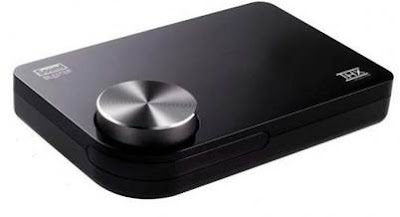
Does the Sound Blaster X-Fi Surround 5.1 Pro THX run on Windows Server 2019?

Image
If you already have a Sound Blaster X-Fi Surround 5.1 Pro THX or thinking of getting one and you are wondering whether it will run on Windows Server 2019 OS.  Good news, it will run on Windows Server 2019. It did on my server. After running a trial test to upgrade my OS from Windows Server 2016 to Windows Server 2019, the SB X-Fi Sur continue to run without any issue. As I have not testing installing the driver from scratch, I suspect that the driver installation would be the same as the steps that I have written about in this post . If you are doing research to find out if it will work on Windows Server 2019 before upgrading, well, it worked for me. Most likely it will also work for you. That’s it. Hope you find it useful.

How to get the Sound Blaster X-Fi Surround 5.1 Pro THX working correctly on Windows Server 2016

Image
How to get the Sound Blaster X-Fi Surround 5.1 Pro THX working correctly on Windows Server 2016 Not able to get the Creative Entertainment Console working after installing the drivers from the original driver CD on Windows Server 2016 for your Sound Blaster X-Fi Surround 5.1 Pro THX ? Although the Sound Blaster device is able to playback sounds without any issue, Creative Entertainment Console will just refuse to launch and complaint that the driver is not present. Looking at the Device Manager, there is no error or missing drivers. How do you go about fixing this issue? After some trial and error, I have managed to get it working. You will need to download the Windows 10  version of the driver from Creative support page, but not all revision of the Windows 10 driver will work.  The version used in this blog post is the [5 Nov 19] release. To get the original CD's Creative Entertainment Console(version 3.00.64) working correctly in Windows 2016, do the...

Replacing Teclast X98 Air 3G bloated battery

Image
After replacing my Teclast X98 Air tablet’s badly bloated battery a few months back with a new battery, the battery is bloating again. Here’s the link to my first battery replacement https://bartman88.blogspot.com/2018/03/replacing-badly-bloated-battery-of-my-teclast-x98-air-3g.html . After the first incident, i am better at spotting the signs of a bloated battery on the tablet. One of the most common signs of a bloated battery is that the tablet is not able to lay flat on the table. This is a very obvious sign that something is wrong with the battery. You might also noticed that the LCD is touching the digitizer surface internally (which it should not be doing). So I opened up the back cover of the tablet once again and true enough, the battery is bloated. But this time, the battery is only half bloated. Since this replacement battery is made up of 2 lithium polymer battery wired in parallel, only one of them has gone bad. Not wanting to spend more money on...

XiaoMi REDMI Note 2 Battery replacement.

Image
Recently, I noticed that the LCD screen on my XiaoMi REDMI note 2 phone is starting to peel off from its frame. I was wondering what could be wrong with the phone. What’s causing the LCD screen to peel off from the frame? Could it be that the adhesive is loosening up? So, I open up the back cover to perform some simple check. Suddenly, the battery flew out from its slot. The battery was so bloated, it is only held in place by the strength of the rear cover. Looks like it’s time to get a replacement battery. I search around and settled for a OEM replacement battery (battery model BM42) on Aliexpress and ordered one. Have a look here if you need to get one for yourself. After almost 4 weeks of waiting it finally showed up in my mail box. Placing them side by side, you can see how badly the original battery has bloated. The new battery fitted into the phone nicely and it is working fine. However, after a few rounds of capacity measurements, I found tha...

Disassembling the XiaoMi NDY-02-AM 5000mah Powerbank

Image
Got this defective XiaoMi 5000mah lithum polymer power bank or power pack quite some time ago. It’s time to strip it apart to have a look under the hood. To get inside this power bank, as there are no visible screws from the outside, you will need to pry out the covers on the sides to reveal the screws. With the screws removed, just slide the battery out from the case. Inspected the PCB and found a burnt component. Looks like its some transistor or a MOSFET. Here’s the rear of the pack in its chassis. But in order to have a clear view of the top of the PCB, the chassis has got to go.. Finally after a short struggle with the double sided tape that is holding down the lithium polymer battery, the front of the PCD is revealed. Hope this is helpful to someone out there. This powerbank is available from Amazon here for those who might be interested.

Installing Sound Blaster X-Fi Surround 5.1 Pro USB on Windows Server 2016.

Image
Sound Blaster X-Fi Surround 5.1 Pro USB on Windows Server 2016 OS? Will it work on a server box? (It works on Windows Server 2008 R2. Check out the post here .) After some testing, I manage to get it running on the Windows Server 2016 OS on a HPE ML310eGen8 v2 server box. There’s no driver specifically meant for Windows Sever 2016. You will need to use the Windows 10 driver instead. However, I found that the latest drivers (2018-Sep) when run, will prompt an error message saying something like the OS is not supported and refuse to continue. Even without installing any drivers, once you plug the Sound Blaster into the USB port, Windows Server 2016 will detect and install the generic sound card driver for it. Although the OS is able to work with the sound card, but without the other accompanying software like “Entertainment Console”, you will not be able to make use of the full capability of the sound card. I wanted to install the driver from the driver CD that ...