Posts

Showing posts with the label USB Sound Card

Inexpensive USB sound card solution for Windows Server 2019

Image
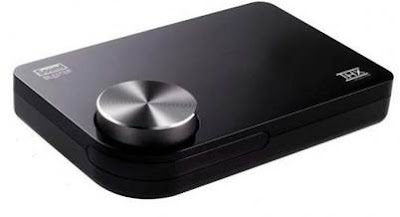
Thought I would give this a test. I have this simple and inexpensive USB sound card that I bought quite some time ago and I was wondering if this would work on Windows Server 2019 OS. I plugged in the USB sound card into the server and very quickly, the device is detect and the driver was installed automatically. The USB sound card is ready for use in less than a minute after plugging in. No additional driver installation needed. Basically, plug and it will play. From the Device Manager This USB sound card has onboard buttons for, Volume Up and Down. Audio Output Mute and Mic Mute. Although, on the device it says “7.1 channel audio”, I doubt that it is possible with this sound card. The audio output from the 3.5mm audio out sounds clean and noise free. The audio output quality is nowhere near that of Creative Sound Blaster surround that I have, but it is decent enough for general audio.   This cheap USB sound card uses the C-Media sound chi...
How to solve the soundcard not available issue with Peak Programme Meter Version 1.90 in Windows Server 2019

Image
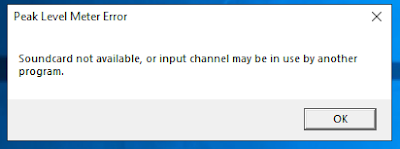
After upgrading my server OS from Windows Server 2016 to Windows Server 2019, the Peak Programme Meter Version 1.90 suddenly stopped working. Every time I ran the program, this error message will pop up: Soundcard not available, or input channel may be in use by another program error message. After I pressed OK, another message pops up: The configured input Device is not available and will be reset to the default. After hours of research on the internet without success, i finally found the answer after another few more hours of debugging and testing. The cause of the program’s failure is due to a microphone’s privacy setting in Windows Server 2019. The default setting for the microphone permission setting is set to off in Windows Server 2019. After toggling the permission to On, the program started working again. To get to the setting, go to Start->Setting->Privacy->Microphone : Toggle the setting to On: And That’s it. Hope i...

Does the Sound Blaster X-Fi Surround 5.1 Pro THX run on Windows Server 2019?

Image
If you already have a Sound Blaster X-Fi Surround 5.1 Pro THX or thinking of getting one and you are wondering whether it will run on Windows Server 2019 OS.  Good news, it will run on Windows Server 2019. It did on my server. After running a trial test to upgrade my OS from Windows Server 2016 to Windows Server 2019, the SB X-Fi Sur continue to run without any issue. As I have not testing installing the driver from scratch, I suspect that the driver installation would be the same as the steps that I have written about in this post . If you are doing research to find out if it will work on Windows Server 2019 before upgrading, well, it worked for me. Most likely it will also work for you. That’s it. Hope you find it useful.

How to get the Sound Blaster X-Fi Surround 5.1 Pro THX working correctly on Windows Server 2016

Image
How to get the Sound Blaster X-Fi Surround 5.1 Pro THX working correctly on Windows Server 2016 Not able to get the Creative Entertainment Console working after installing the drivers from the original driver CD on Windows Server 2016 for your Sound Blaster X-Fi Surround 5.1 Pro THX ? Although the Sound Blaster device is able to playback sounds without any issue, Creative Entertainment Console will just refuse to launch and complaint that the driver is not present. Looking at the Device Manager, there is no error or missing drivers. How do you go about fixing this issue? After some trial and error, I have managed to get it working. You will need to download the Windows 10  version of the driver from Creative support page, but not all revision of the Windows 10 driver will work.  The version used in this blog post is the [5 Nov 19] release. To get the original CD's Creative Entertainment Console(version 3.00.64) working correctly in Windows 2016, do the...

Installing Sound Blaster X-Fi Surround 5.1 Pro USB on Windows Server 2016.

Image
Sound Blaster X-Fi Surround 5.1 Pro USB on Windows Server 2016 OS? Will it work on a server box? (It works on Windows Server 2008 R2. Check out the post here .) After some testing, I manage to get it running on the Windows Server 2016 OS on a HPE ML310eGen8 v2 server box. There’s no driver specifically meant for Windows Sever 2016. You will need to use the Windows 10 driver instead. However, I found that the latest drivers (2018-Sep) when run, will prompt an error message saying something like the OS is not supported and refuse to continue. Even without installing any drivers, once you plug the Sound Blaster into the USB port, Windows Server 2016 will detect and install the generic sound card driver for it. Although the OS is able to work with the sound card, but without the other accompanying software like “Entertainment Console”, you will not be able to make use of the full capability of the sound card. I wanted to install the driver from the driver CD that ...

Using the Creative Sound Blaster E1 (USB Sound card) on a Windows server 2012 r2 server.

Image
Using the Creative Sound Blaster E1 (USB Sound card) on a Windows server 2012 r2 server. Sound Blaster E1 Portable Headphone Amplifier The Sound Blaster E1 is both a portable headphone amplifier and a USB sound card contained in one small handy device. If you are thinking of getting the sound blaster E1 or you already have a sound blaster E1 and are thinking of getting another USB sound card for server, read on…… I have done a post on this same Sound Blaster E1 USB sound card running on Windows Server 2008 R2 in the past (you can check it out here: http://bartman88.blogspot.com/2014/09/sound-blaster-e1-sb1600-usb-hd-audio.html ) In this post, I am going to see if it will work on the Windows Server 2012 R2 OS. Here we go: Remember to switch ON the E1 for it to work as a USB sound card. Upon inserting the USB cable into the E1, the OS will detect the device and it will start installing the generic drivers for it. It you are quick enough, you shoul...

Creative Sound Blaster Play USB sound card installation on server Windows 2012 R2 OS.

Image
Creative Sound Blaster Play USB sound card does not officially support running on Windows Server 2012 R2 or any other windows server OS. Will this work? Let’s give it a try and find out if it will run. In this test, a server box installed with Windows Server 2012 R2 is used. It’s a HP Proliant DL380Gen8. Once the SB Play is inserted into the USB port, the default stock driver will automatically be installed. From the device manager, we can see that the device is detected and the generic driver is installed. Here is the detail of the installed generic USB audio driver. Next, downloaded the driver/software file from the Creative support page. The file downloaded is a windows 8 driver/software file. The filename is “SBPY_PCDRV_LB_1_02_0003a.exe”. You can download it here . During the installation process, you will be prompted with this message, just click on “Install”. Installation is complete. Reboot the server so that the newly insta...