Posts

Showing posts with the label Audio Stuff

Unable to get audio in Open Broadcast Software OBS in Windows Server 2019.
Image
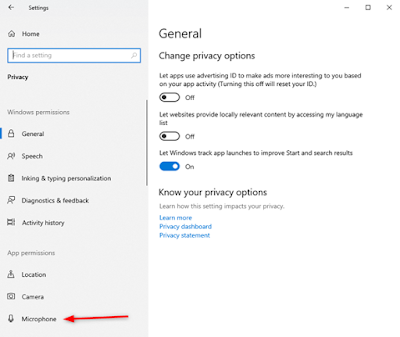
When running Open Broadcast Software (OBS) version 24.0.3, I found that I could not get any audio from my USB microphone or the audio source playback from my USB sound card. The VU meter on OBS did not move even when I am playing back video clips on VLC or a mp3 player. After some debugging, I found that the issue has to do with the OS microphone permission setting. To change the microphone setting, goto Start->Settings->Privacy : Toggle the following setting to ON. After changing the microphone privacy setting, I started up OBS, selected the desired audio source and the VU meter came back to life. That’s it. Hopefully this is helpful.
How to solve the soundcard not available issue with Peak Programme Meter Version 1.90 in Windows Server 2019

Image
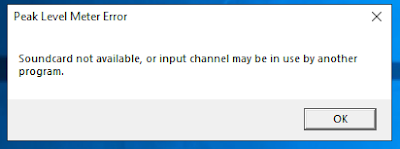
After upgrading my server OS from Windows Server 2016 to Windows Server 2019, the Peak Programme Meter Version 1.90 suddenly stopped working. Every time I ran the program, this error message will pop up: Soundcard not available, or input channel may be in use by another program error message. After I pressed OK, another message pops up: The configured input Device is not available and will be reset to the default. After hours of research on the internet without success, i finally found the answer after another few more hours of debugging and testing. The cause of the program’s failure is due to a microphone’s privacy setting in Windows Server 2019. The default setting for the microphone permission setting is set to off in Windows Server 2019. After toggling the permission to On, the program started working again. To get to the setting, go to Start->Setting->Privacy->Microphone : Toggle the setting to On: And That’s it. Hope i...

Does the Sound Blaster X-Fi Surround 5.1 Pro THX run on Windows Server 2019?

Image
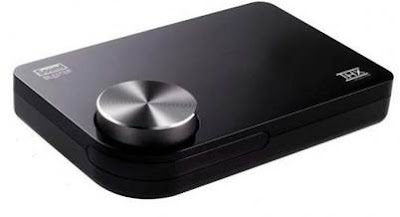
If you already have a Sound Blaster X-Fi Surround 5.1 Pro THX or thinking of getting one and you are wondering whether it will run on Windows Server 2019 OS.  Good news, it will run on Windows Server 2019. It did on my server. After running a trial test to upgrade my OS from Windows Server 2016 to Windows Server 2019, the SB X-Fi Sur continue to run without any issue. As I have not testing installing the driver from scratch, I suspect that the driver installation would be the same as the steps that I have written about in this post . If you are doing research to find out if it will work on Windows Server 2019 before upgrading, well, it worked for me. Most likely it will also work for you. That’s it. Hope you find it useful.

Installing Sound Blaster X-Fi Surround 5.1 Pro USB on Windows Server 2016.

Image
Sound Blaster X-Fi Surround 5.1 Pro USB on Windows Server 2016 OS? Will it work on a server box? (It works on Windows Server 2008 R2. Check out the post here .) After some testing, I manage to get it running on the Windows Server 2016 OS on a HPE ML310eGen8 v2 server box. There’s no driver specifically meant for Windows Sever 2016. You will need to use the Windows 10 driver instead. However, I found that the latest drivers (2018-Sep) when run, will prompt an error message saying something like the OS is not supported and refuse to continue. Even without installing any drivers, once you plug the Sound Blaster into the USB port, Windows Server 2016 will detect and install the generic sound card driver for it. Although the OS is able to work with the sound card, but without the other accompanying software like “Entertainment Console”, you will not be able to make use of the full capability of the sound card. I wanted to install the driver from the driver CD that ...

5 Free audio VU meter software for your Windows PC.

Image
If you are like myself who likes to see their music move to an audio visual indicator like a VU meter, you should check out the following software. I have been using the these software for quite some time now and it’s always interesting to see some like of visual audio activities while the music is playing. These audio VU meter have been tested to run on Windows 2008 R2 which is the OS that I am currently using. All the Creative USB Sound Blaster sound card that I have is able to work with the 5 audio VU meter software that is listed below. The sound cards are: Sound Blaster E1, Sound Blaster Play, Sound Blaster Digital Music Premium HD, Sound Blaster X-Fi Surround 5.1 and a cheap C-media chip-set USB sound card. The 5 free audio VU meter software in no particular order are:   1.  Audio Level Meters  by Paul Marshall ( http://www.darkwooddesigns.co.uk/pc2/meters.html ) Available in both Digital and Analog style meter and in a variety of designs to ...

Aiwa HP-M16 headphone specs

Image
I have been using this Aiwa headphone for years. It’s cheap and good and it pairs very well with the Creative Sound Blaster USB sound cards that I have. When I checked the receipt that i had for this headphone, it was dated 2003 (and today it’s 2016). It’s been a long time since then. Recently, the pair that I have been using started to fail on the left side. I found out that the wire in the cord near the left driver is suffering from an intermittent open circuit. Manage to pry open the casing, snip off the defected section and soldered and wires back. Finally, it’s back to in action again. Due to the incident, I decide to look around to see if anyone is still selling this headphone (HP-M16 brand new). I did find a few sellers but they have already sold out on the headphones(a similar model HP-M38) a few years ago. I tried to look for the specs of HP-M16 and HP-M38 to see if they are the same, but I just couldn’t find them on the internet. So……. I dig through a ...